

Who it’s for:Admin
Available on:Web
When the same loss gets entered twice, combine the jobs instead of deleting one and documenting it again. Merging combines whole jobs. Moving transfers one thing, such as a post or a moisture map, and is covered at the end of this article.
Only Admins can merge jobs. Everyone else sees Merge Job greyed out on the job card’s menu in the Jobs list, and Project Leads also see it greyed out under Actions on the job page.
Merge jobs
Start from the job you want to keep. Everything else is merged into it.- In the web app, open Merge Job from either place:
- the menu on that job’s card in the Jobs list, or
- Actions on the job’s own page.
- Select the jobs to merge in. Search by job code, address, contact, or company, tick one or more jobs, and select Next: Review Fields.
- Resolve fields. For each detail the jobs disagree on, such as job code, claim number, dates, address, team, status, or company, pick which job’s value to keep. For some fields you can type your own value instead. Details the jobs already agree on need no decision.
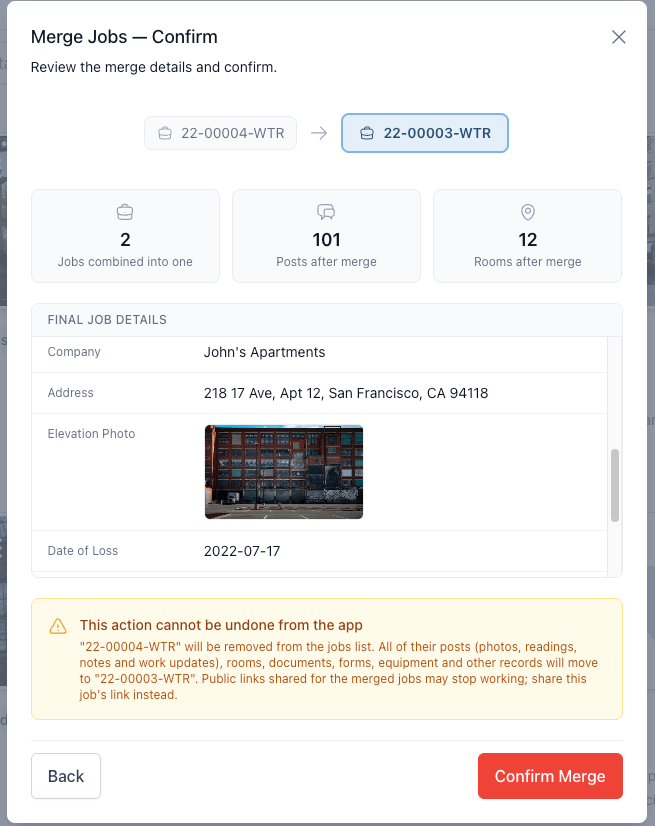
- Confirm. Review the final job details. If a room name exists on more than one of the jobs, tick Combine these rooms and continue. Then select Confirm Merge.
What happens to the merged-in jobs
- Everything they hold moves to the job you kept: activity feed posts, rooms, documents and folders, form responses, equipment, walkthroughs, 360° captures, estimates, and the rest of the job’s records.
- Rooms with the same name are combined into one room on the job you kept, so their photos, readings, and scope sheet answers end up together. Only the work tags of the kept room carry over. See Locations: rooms within a job.
- Rooms with names that don’t match anything on the kept job move over as extra rooms.
- The merged-in jobs no longer appear in the Jobs list. Work from the job you kept.
- If you shared a merged-in job with an adjuster or other outside party through a link, send them the kept job’s link instead. See Team, participants, and sharing a job externally.
Move one thing instead
Moving posts is done in the web app by Admins and Project Leads, from the menu on the post in the activity feed. Readings that belong to a moisture map move with the map, not one at a time.
Duplicating a job doesn’t move anything. See Duplicating a job.